Home Mental Maths › Your Plan
Changing your plan
BrainBuzz
Help Centre · brainbuzz.co.uk
You can move to a larger or smaller plan at any time from your account page on the BrainBuzz website.
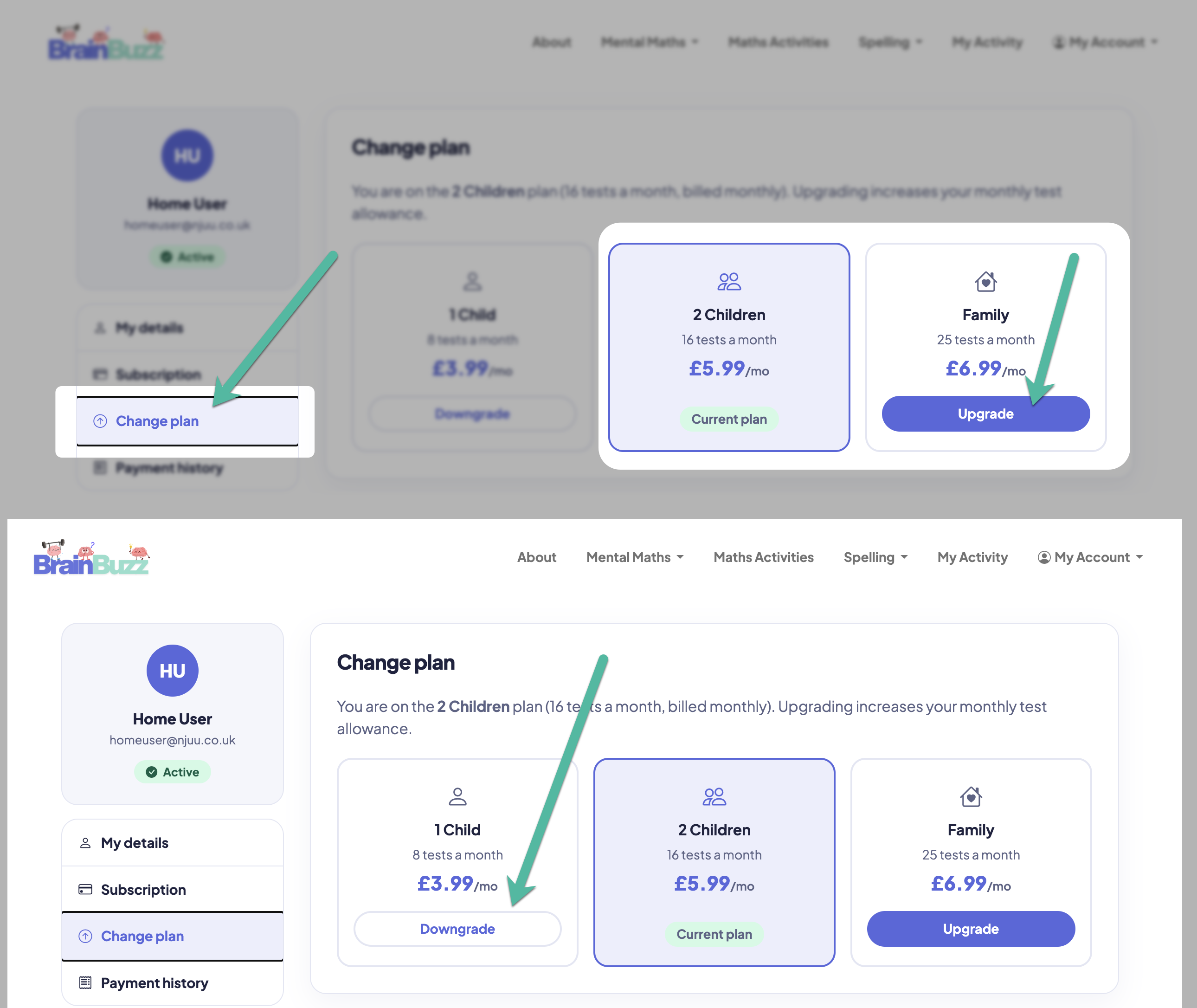
- Sign in on the BrainBuzz website, open My Account and choose Subscriptions from the menu on the left.

How to upgrade or downgrade
- Your current plan is highlighted, along with your plan dates.
- To get more tests each month, choose Upgrade on a larger plan. You'll see exactly what you'll pay now and what your next full payment will be before you confirm.
- To move to a smaller plan, choose Downgrade on that plan and confirm.
When it takes effect
- Upgrades take effect straight away, so you get your extra tests immediately. You pay the difference for the rest of your current billing period, which is taken from your card when you confirm. If the payment can't be taken, your plan isn't changed.
- Downgrades take effect at your next renewal. You keep your current plan and allowance until then, and your next payment is at the new, lower price.